Smart Prompt Writing
Write effective prompts that deliver accurate
and relevant AI outputs.
Improve Output Quality
Work Smarter
How it Works
1
Define Your Objective
Clearly specify the desired outcome
2
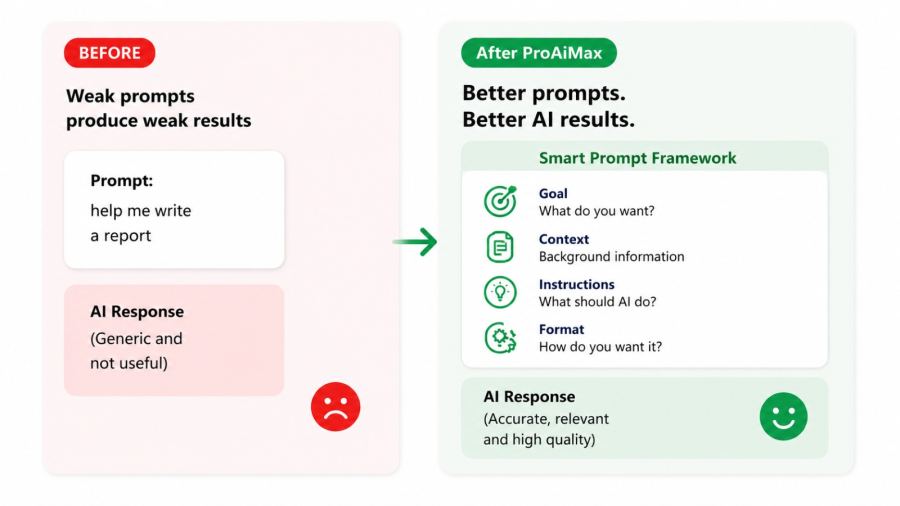
Structure Your Prompt
Add context, instructions, and expected format
3
Generate Better Results
Receive accurate and high-quality AI responses
Key Takeaway
Master the skill of communicating clearly with intelligent systems so you consistently receive accurate, structured, and usable outputs.
Example Scenario
You ask for help drafting a response to a client query, but the output is vague and not usable. After learning smart prompting, you reframe the request by adding context, constraints, and the expected format. The result now matches your requirement exactly. You realise the power lies not in the tool but in how you communicate with it.
Practical Use Cases
- Drafting technical and management documents. Generating structured comparisons and explanations. Creating reusable request templates. Improving consistency and accuracy of outputs.
Outcome You'll Feel
You feel confident and in control, knowing how to get exactly what you need without trial and error.
Tools Used
Software and platforms covered in this module
- Free tools
- Chatgpt
- Gemini
- Claude, etc